Smart Ring + Apple Health UK 2026: Setup & Data Flow
How smart rings integrate with Apple Health on UK iPhones - Oura, RingConn, Ultrahuman, Samsung Galaxy Ring data flow, setup, what syncs and what doesn't.
UK iPhone users buying a smart ring care about Apple Health integration - the iPhone's central health data store is the natural aggregator for HRV, sleep, and activity data across devices. The integration quality varies meaningfully between smart ring brands, and the practical implication is whether your full health picture sits in Apple Health (good - searchable, exportable, comparable across years) or fragmented across separate brand apps (less useful). This guide covers the Apple Health integration for each major 2026 smart ring on UK iPhones.
How do you set up smart ring + Apple Health integration?
The setup pattern is similar across brands:
- Install the brand's iPhone app (Oura, RingConn, Ultrahuman, Samsung Health, Zepp Life).
- Sign in and pair the ring. Bluetooth pairing typically takes 2-5 minutes.
- Open the brand app's settings, navigate to Integrations, find Apple Health. The exact path varies by brand but all include a one-tap Apple Health connection.
- Tap 'Enable Apple Health integration' and review the data categories. Each ring presents a list of metrics it wants to write to Apple Health. Enable all - you can disable specific categories later if needed.
- Allow the connection. Apple Health asks for confirmation per category.
- Wait 24-48 hours for full data flow. Historical data from the past 30-90 days syncs over the first few days.
After setup, the data flows automatically. The brand app remains the primary place to view detailed analysis; Apple Health is the aggregator that combines the ring data with iPhone activity, Apple Watch data (if applicable), and other health-app inputs.
Which smart ring has the deepest Apple Health integration?
The 2026 integration quality ranking:
Oura Ring 4 (deepest integration). Oura syncs 15+ data categories including HRV, RMSSD, sleep stages (deep, REM, light), body temperature, workouts, mindfulness minutes, cycle tracking (with predictions), and activity data. The integration is bidirectional - Apple Health workouts logged via Apple Watch flow into Oura's Activity score. Best for iPhone-centric users wanting the most complete Apple Health data picture.
Ultrahuman Ring Pro (strong integration). Ultrahuman syncs core metrics (HRV, sleep, heart rate, temperature, workouts) cleanly. The PowerPlug architecture means specific dashboards stay in the Ultrahuman app while raw data flows to Apple Health. Best for users wanting the Ultrahuman analytical depth alongside Apple Health aggregation.
RingConn Gen 3 (good integration). RingConn syncs the core HRV, sleep, heart rate, and temperature data to Apple Health. Cycle tracking data also syncs but with less detail than Oura. Best for no-subscription users who still want the Apple Health unified view.
Samsung Galaxy Ring (limited integration). Samsung Health → Apple Health is a two-hop sync via Samsung Health's integration. The delay is typically 1-2 hours and some data categories don't transfer. Best for users already in the Samsung ecosystem; less ideal for iPhone-primary users.
Amazfit Helio Ring (limited integration). Zepp Life app to Apple Health sync exists but is the least mature of the major brands. Best for users prioritising lowest hardware cost and tolerating less seamless integration.
What data does Apple Health show for the smart ring?
Once integrated, the iPhone Apple Health app surfaces ring data in these standard categories:
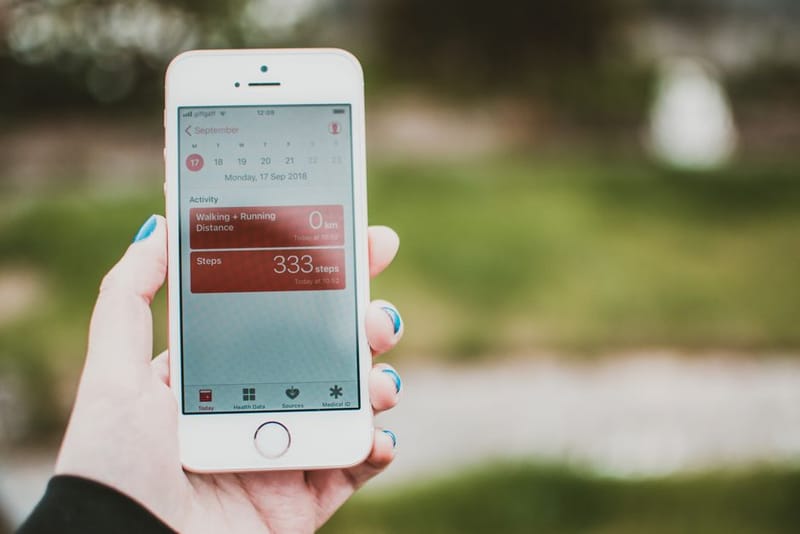
- Activity: Steps, active energy, exercise minutes, stand hours. Most rings count steps; some (Oura) also calculate active calories.
- Heart: Heart rate (resting, walking, workout), HRV (RMSSD), cardio fitness.
- Sleep: Sleep stages, time in bed, time asleep, sleep efficiency.
- Body Measurements: Body temperature, wrist (finger) temperature.
- Cycle Tracking: Period dates, fertility window predictions, cycle deviations.
- Mindfulness: Mindful minutes (Oura only; logged when using the breath training feature).
- Vitals (iOS 17.4+): The new aggregate Vitals view in iOS 17.4+ surfaces ring HRV alongside sleep and respiratory rate as a daily snapshot.
The Apple Health Sharing feature lets you share these categories selectively with family members or a GP. For UK NHS app integration (limited but growing in 2026), Apple Health is the entry point.
Should I keep using Apple Watch alongside a smart ring?
Most Apple Watch users keep both devices and use them for different purposes:
- Apple Watch: Daytime activity tracking, workout pace and route, notifications, payments, music control. Better at GPS-during-workout and live data than any smart ring.
- Smart Ring: Overnight sleep tracking (Apple Watch battery rarely lasts a full sleep window), HRV trend baseline, body temperature, all-day continuous tracking. Better at the recovery side than the Apple Watch.
For Apple Watch users specifically, Oura's integration with the Apple Health workouts surface is the strongest - Apple Watch workouts logged via the Apple Watch flow into Oura's Activity score automatically. RingConn and Ultrahuman both rely on manual workout entry or the user enabling the ring's auto-detect workout feature for full picture.
The dual-device cost should be considered: Apple Watch SE £249 + Oura Ring 4 £399 + £71.88/year subscription = £719.88 in year 1, with the subscription continuing. Apple Watch SE + RingConn Gen 3 = £598 total in year 1 with no ongoing subscription. The Apple Watch alone (£249) is the budget option that captures most of the same data, with sleep tracking being the main gap (Apple Watch battery limits multi-night reliability).
Frequently asked questions
Do smart rings work with iPhone in the UK?
Which smart ring has the best Apple Health integration?
Will my smart ring data flow into my GP's records via Apple Health?
Can I disconnect Apple Health and use just the brand app?
Does the ring still work if Apple Health integration fails?
Best Smart Ring for iPhone UK 2026
Smart Ring vs Smartwatch
Smart Ring Buying Guide
Smart Ring Data Privacy

Smart Ring + MyFitnessPal